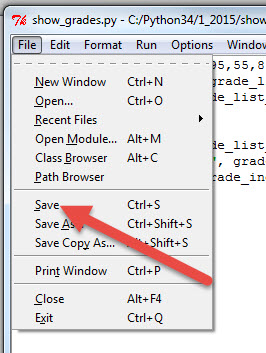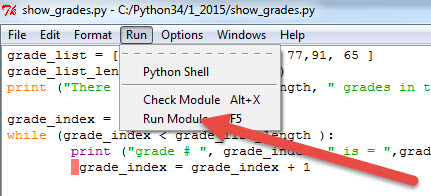
Python programs to write : Homework
Given a list containing the grades that a group of students got on a quiz, compute the class average. Start with this:
grade_list = [86,53,78, 95,55,84, 77,91, 65 ]
grade_list_length = len(grade_list)
print ("The list contains ", grade_list_length, " grades.")
Write the steps to compute the average grade.
Here is a program using the list and a "while" loop. Note that indentation of the statements in the while loop. Statements inside a block of code following a (colon) : must all use the same indentation. If a second block is nested in the first, then those statements are indented further, and must use the same indentation. There is an example of nested blocks (while loops) in the "Sort List Example" linked to on this site's home page.
For example, the program below should work:
grade_list = [86,53,78, 95,55,84, 77,91, 65 ]
grade_list_length = len(grade_list)
print ("There are ", grade_list_length, " grades in the list.")
grade_index = 0
while (grade_index < grade_list_length ):
print ("grade # ", grade_index, " is = ",grade_list[grade_index])
grade_index = grade_index + 1
This next one will fail, and give an error message because the last line is indented an extra space.
grade_list = [86,53,78, 95,55,84, 77,91, 65 ]
grade_list_length = len(grade_list)
print ("There are ", grade_list_length, " grades in the list.")
grade_index = 0
while (grade_index < grade_list_length ):
print ("grade # ", grade_index, " is = ",grade_list[grade_index])
grade_index = grade_index + 1
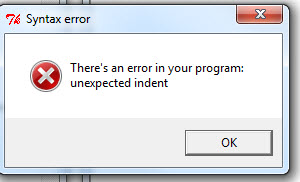
The error I got was
XXXXXXXXXXXXXXXXXXXXXXXXXX
Help notes: Remember that control-c copies a selected text into a buffer. Control-v pastes whatever is in the buffer to wherever the cursor is. Sometimes cutting and pasting around IDLE prompt, >>, does not work too well and you may have to actually type out the lines again. Control a will select "everything" when the cursor is in a paticular section, such as a text window.
Also, remember that Control-c is also used to stop an endless loop run by a program. If you run the program below it will go into an endless loop. Use Control-c to stop it.
index = 0
while (index < 5 ):
print("The index is now ", index)
Here is a new one: Control-z will undo the last thing you did. For example if you paste something into the wrong place and want to "undo" that paste, press Control-z. Control-z is especially nice to know about when you accidentally delete part of a program you are coding.
XXXXXXXXXXXXXXXXXXXXXXXXXXXXXXXXXX
If you get a program to compute the class average, try to write one that will tell the difference between the class average and each grade. Here are some program statements like ones you will use:
average = 64
print ("The grade of ",grade_list[2], " is ", (grade_list[2] - average), "different from the average of ", average)
or you could have
diff = (grade_list[2] - average)
print ("The grade of ",grade_list[2], " is ", diff, "different from the average of ", average)
Note: Though entering Python statements in IDLE shell, after the >> prompt, is a good way to test some things, you will find that in most situations it is better to write programs into a file and then run that program from the file.
How to use a file for programs when using Idle:
This will create a new file for you to type in.
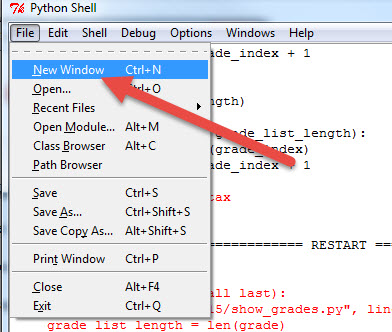
Then you will have to save it and run it.