Python Class Downloads & Instructions
This class uses Python version 3.0 or higher (currently 3.4.3). The install file can be downloaded from python.org/downloads. There are different versions for some versions of Windows and Macintosh Operating systems. There are Youtube videos showing how to download and install Python.
Though the the Python 3.4 system includes and editor (the IDlE edtior), students are encouraged to also work with the Notepad++ editor. Instructions for downloading and installing are given below. Click here for Notepad++ install instructions.
Python Download and Install
| Harry's Instructions | below | |
| Python.org Downloads | https://www.python.org/downloads/ | |
| Python Install - Youtube video | https://www.youtube.com/watch?v=O_xBNq833bM | |
| Python Install - Another Youtube video | https://www.youtube.com/watch?v=FpTiE0D4Zs8 | |
| Install Instructions - Scroll down after entering site | http://www.annedawson.net/Python3_Install_Run.htm |
Harry's Instructions for Downloading and installing Python 3.4
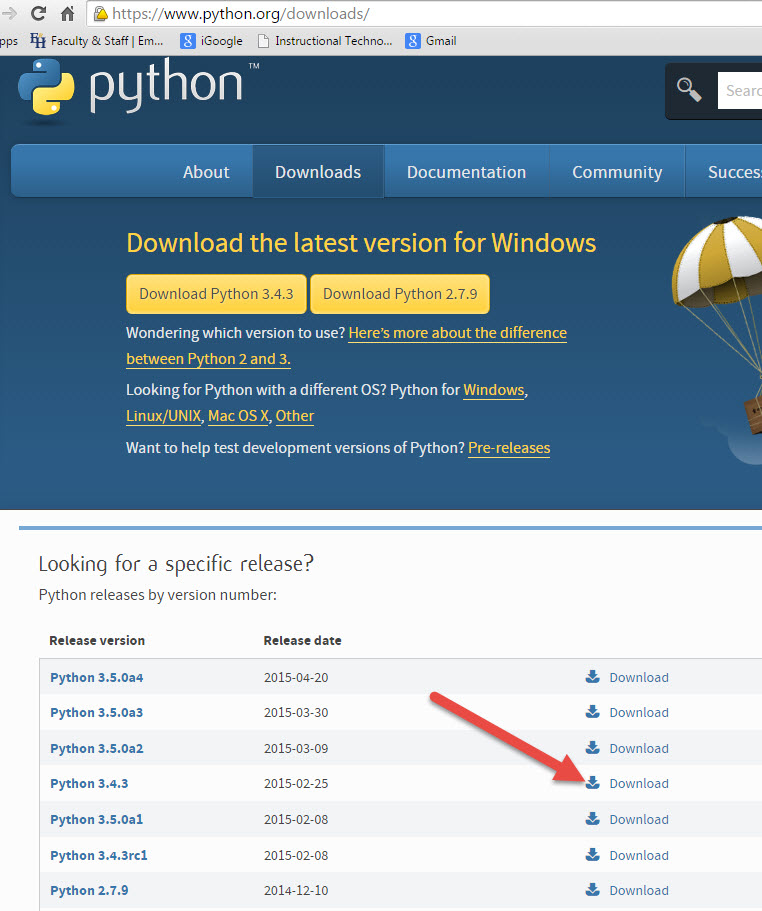
Go to the Python.org/download website : https://www.python.org/downloads/ and click on Python 3.4.3 Download (see screen capture below)
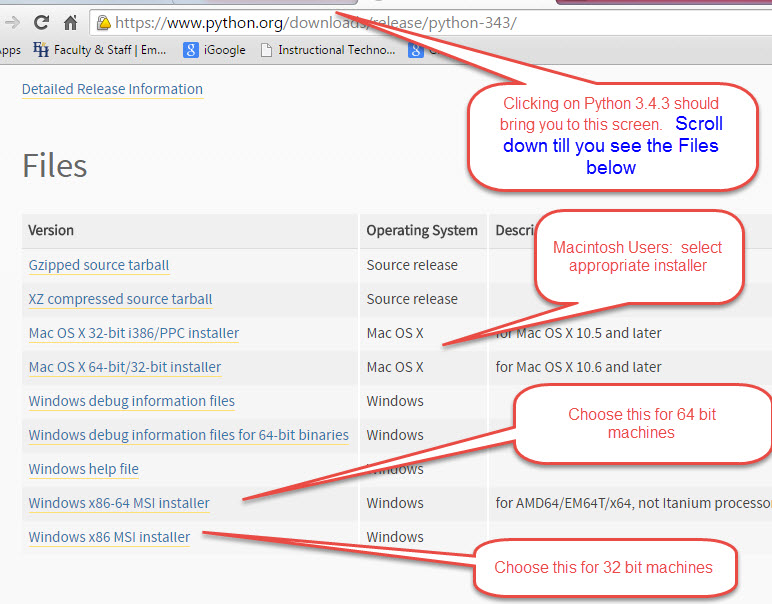
On the next screen scroll down to select the appropriate installer:
Windows 32 bit (older Windows machines. ) Windows x86 MSI installer
Windows 64 bit (newer Windows Machines ) Windows x86-64 MSI installer
Note: To find out whether your Windows machine is 32 bit or 64 bit, right click the "Computer" icon (or menu item) and select "Properties)
The downloaded install file for Windows will be similar to python-3.4.3.msi
Macintosh (see instructions in table for which installer to download)
Screen Captures below show the above steps
After you have downloaded the install file, find it and double-click it (and right-click and choose "open/run" or the equivalent). You should be able to use all the default choices for the screens in the install process. This will install the Python IDE (Interactive Development Environment) on your computer
Notepad++ Download and Install
| go to the Notepadd++ download site | http://notepad-plus-plus.org/download/v6.7.7.html | |
| The above step may take a while. You may see a "waiting" message on your screen. | ||
| This will download "npp.6.7.7.Installer.exe" | ||
| Find the install file and run it (double click normally works) | "npp.6.7.7.Installer.exe - This will install the Notepad++ editor on your computer. | |
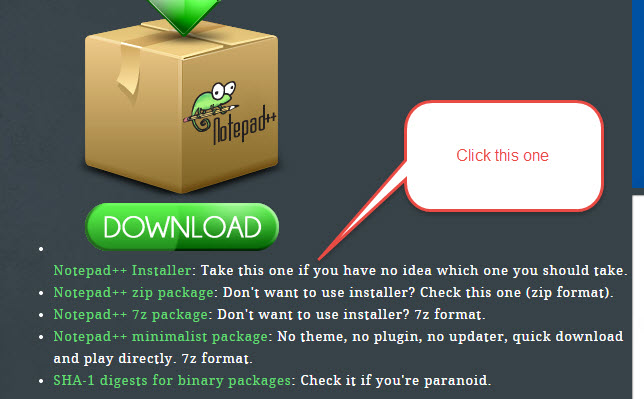
It may take a few minutes to download the install file. The file name will be npp.6.7.7.Installer.exe
Run it to install the Notepad++ editor